

Organizing events for your community means balancing two competing needs: keeping things clean by removing old events, and preserving the history that makes your community special. For event organizers, this has meant making a tough choice—until today.
We’re excited to announce event archiving. You can now remove events from Discord while preserving complete history on the dashboard — the best of both worlds.
How archiving works
Archiving an event is simple. When deleting an event, you’ll now see an Archive button alongside the delete option.
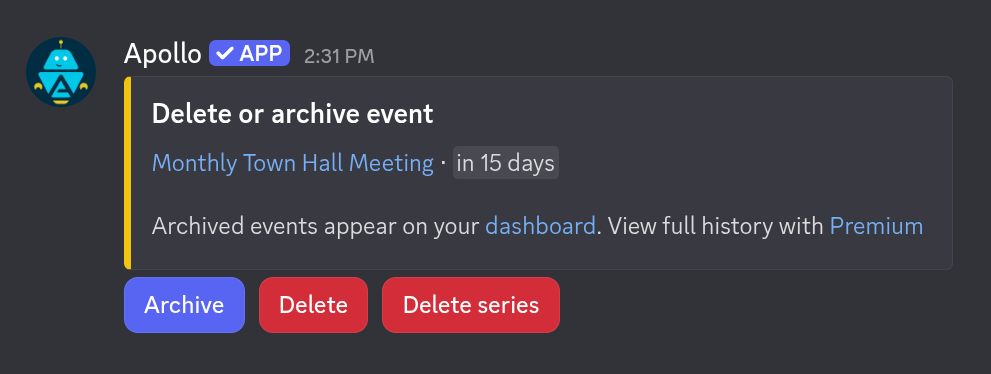
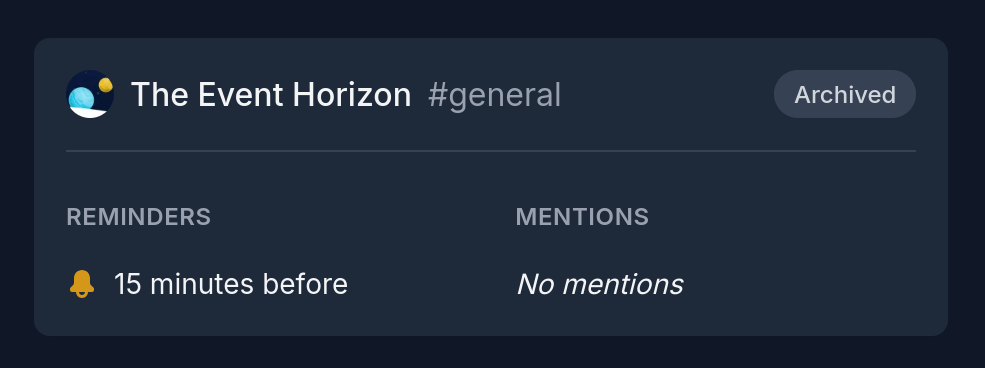
Archived events are removed from Discord — they won’t clutter your server or appear when editing or viewing upcoming events. But they’re not gone. You’ll find them on the dashboard with a clear indicator showing they’ve been archived.
Archive events automatically
Many communities already use automatic deletion to keep their servers tidy. This feature just got better. Past events now archive automatically instead of disappearing completely, giving you a clean Discord server with complete event history on the dashboard.
To reflect this improvement, the /settings auto_delete command has been
renamed to /settings auto_archive — same cleanup power, with history
preserved.
What about previously deleted events?
We’ve been quietly preparing for this feature for years. Many events that were previously deleted have been carefully restored to an archived state. We focused on events that concluded naturally — those most likely deleted during routine cleanup rather than for other reasons.
If something doesn’t look right, you can permanently delete it from the dashboard.
History limits
For Premium members, event history is unlimited. Free members can view events for the current and previous month. Have extensive history? Upgrading to Premium unlocks your complete archive.
How to get started
Ready to explore your event history? Access it via the
dashboard, or use the new /dashboard command
in Discord.
Your feedback is important to us! If something doesn’t look right with your restored events, come chat with us on our Discord server.